Using this guide
Navigation
Navigate through the content using the NAVBAR and SIDEBAR
Icons
This guide references the icons that are used to guide you in how the content preparation might take place at different stages in the project task set. They will also describe the types of content you should create.
| Icon | Meaning and Action |
|---|---|
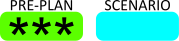 |
This icon means that you can create all of the the content before you receive the Task Brief and Scenario because it applies to all software projects, or defines something that will not change, regardless of the scenario set. |
 |
This means that the large majority of the content can be prepared in advance using default content. When you receive the brief and its scenario, you'll contextualise to emphasise what must be included in the scope because of the scenario set. |
 |
This icon means that you'll only be able to prepare a small of the content in advance because the scope of the scenario is required to finalise the content. Even if this is true, the sample material and exercise tasks will allow you to plan for the structure in advance, and create the content in the task sessions. |
 |
This icon means that the content relies entirely on the scenario set out in the brief. Even if this is true, like the item 1-2 above, the sample material and exercise tasks will allow you to plan for the structure in advance, and create the content in the task sessions. |
Overviews
Most sections of the support site contain brief overview support videos that will help you understand what is required for the Portfolio element being considered in that section.
This icon will take you to a YouTube hosted video, so you'll need an Internet connection to view the content.

Content Types
Some of the content to be created requires the production of different types of content. These are the guidance icons for these.
| Icon | Meaning and Action |
|---|---|
 |
Your work will be an essay. You will write about the aspect in the Project using a good academic writing style. |
 |
Your content will something you make. This work can include items like tables, diagrams, flowcharts, pseudocode, interface designs, and so forth. |
 |
This content will help you understand the topic and be able to write about it. It will support your content development. |
IMPORTANT
The work you produce should demonstrate care and attention to detail. You will receive credit for:
- professional layout and presentation of the document.
- consistency of styles and layouts.
- care in the use of spelling and grammar, especially the absence of spelling mistakes.
- correct acknowledgement of any external sources you have used during research and in the preparation of content. You will achieve this by using the APA referencing system.